Clear and trackable delivery Real guarantees on every order Fast help when you need it
Villalta Home Co.
Connect Legacy AV Equipment to Any HDMI Display - Default
Connect Legacy AV Equipment to Any HDMI Display - image 1
Connect Legacy AV Equipment to Any HDMI Display - image 2
Connect Legacy AV Equipment to Any HDMI Display - image 3
Connect Legacy AV Equipment to Any HDMI Display - image 4
Connect Legacy AV Equipment to Any HDMI Display - image 5
Connect Legacy AV Equipment to Any HDMI Display - image 6
Connect Legacy AV Equipment to Any HDMI Display - image 7
Connect Legacy AV Equipment to Any HDMI Display - image 8
Connect Legacy AV Equipment to Any HDMI Display - image 10
Connect Legacy AV Equipment to Any HDMI Display - image 11
Connect Legacy AV Equipment to Any HDMI Display - image 12
Connect Legacy AV Equipment to Any HDMI Display - image 13
Connect Legacy AV Equipment to Any HDMI Display - image 14
Connect Legacy AV Equipment to Any HDMI Display - image 15
Connect Legacy AV Equipment to Any HDMI Display - image 16
Connect Legacy AV Equipment to Any HDMI Display - image 17
Connect Legacy AV Equipment to Any HDMI Display - image 18
Connect Legacy AV Equipment to Any HDMI Display - image 19
Connect Legacy AV Equipment to Any HDMI Display - image 20
Connect Legacy AV Equipment to Any HDMI Display - image 21
Connect Legacy AV Equipment to Any HDMI Display - image 22
1/22

Connect Legacy AV Equipment to Any HDMI Display

Home improvementInstallation Professional
Fast delivery
Estimated delivery in 3 days
£11.39Only 8 left in stock!
Dimensions:190 x 120 x 20 mm
Weight:0.104 kg
Home improvement
Total price£11.39
Secure checkout
Tracked delivery
Email support

Only a few units left (8)!

Quick purchase

£11.39

Connect Legacy AV Equipment to Any HDMI Display

Default

Buy with context

Fit, prep and delivery

Estimated delivery in 3 days with tracked fulfilment.

Best for

  • Use older AV equipment on any modern HDMI display
  • Set up in minutes without software, drivers, or tools
  • Power from the television's own USB port for a tidy setup

What's included

  • 1 x AV to HDMI Converter Cable (composite RCA female to HDMI male)
  • 1 x USB Power Cable
  • 1 x Instruction Booklet

Availability and fulfilment

  • Available stock: 8 units
  • Ships to United Kingdom
  • Estimated delivery in 3 days
  • Package weight: 0.1 kg

Connect Legacy AV Equipment to Any HDMI Display

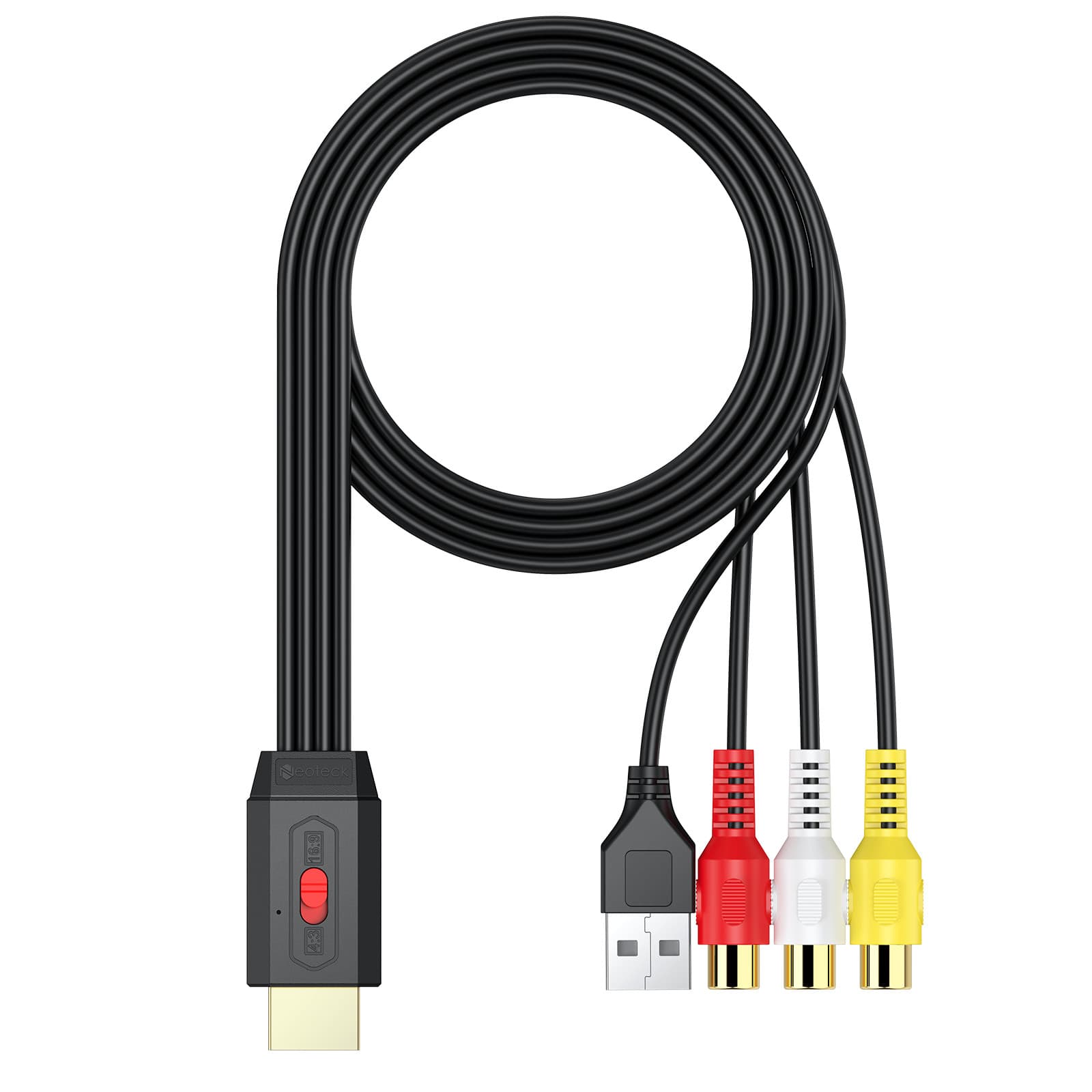
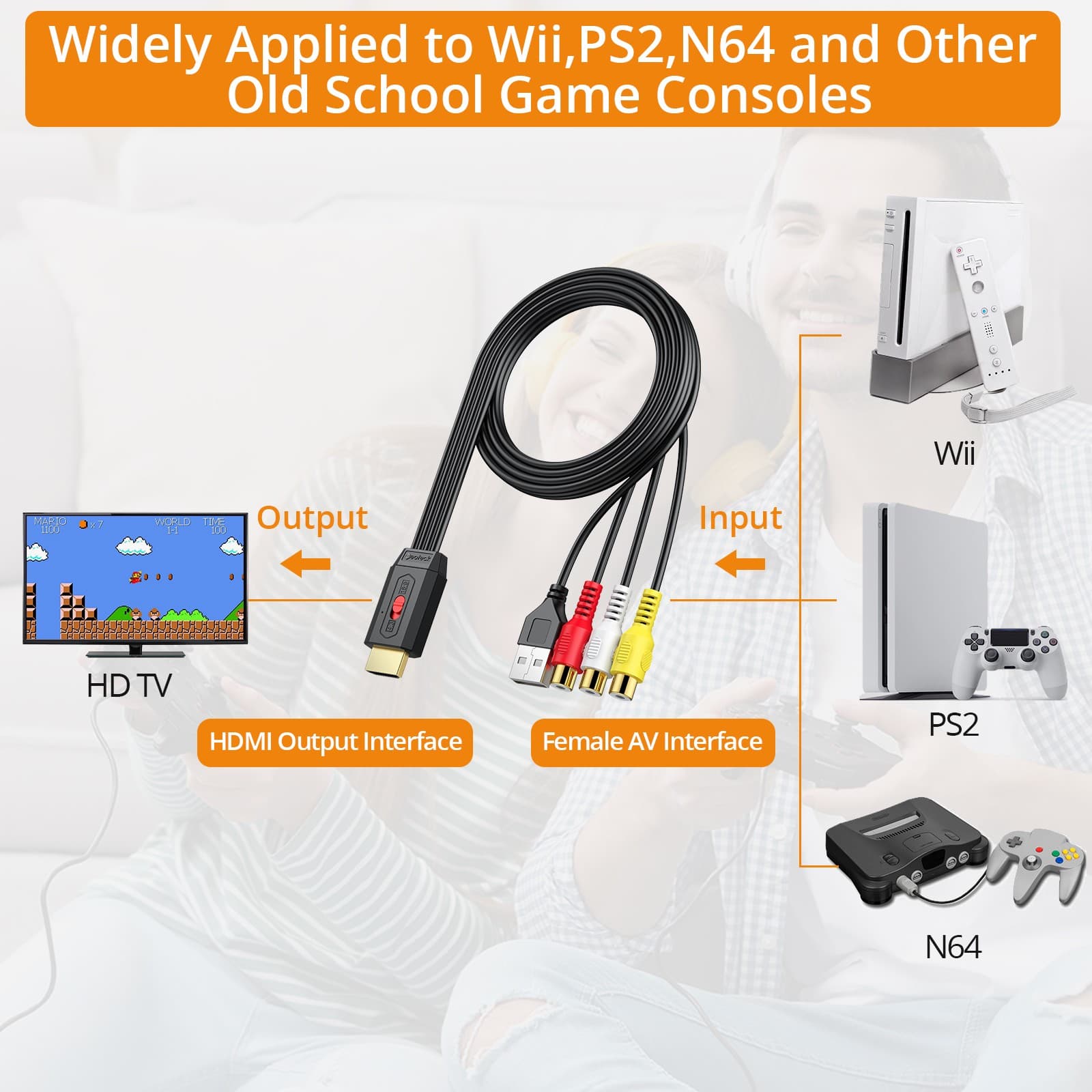
This cable bridges the gap between older composite AV equipment and modern HDMI displays, handling the signal conversion internally so you can see legacy video sources on a current television or monitor. One end connects to the RCA outputs of any device with composite video and stereo audio — the standard three-plug arrangement of yellow, white, and red — while the HDMI plug connects directly to a display. A USB cable powers the conversion electronics; this can run from a television's USB port or a standard wall adapter. Aspect ratio switching between 4:3 and 16:9 is handled by a toggle built into the cable housing. Worth noting: the converter changes the connection interface only — it does not upscale the

  • Composite RCA to HDMI: Connects yellow, red, and white RCA outputs to any HDMI display without additional hardware or software.
  • 4:3 and 16:9 Aspect Ratio Switch: Toggle on the housing matches the output to the aspect ratio of your source material.
  • USB Powered: Runs from a TV USB port or standard USB charger — no mains adapter or batteries required.
  • No Driver Installation: Plug-and-play setup on any HDMI-equipped display with no software configuration needed.
  • Signal Interface Converter: Transfers the connection type cleanly; source image quality is preserved as-is from the original device.

Legacy Composite Video on Your HDMI Display

Three-cable RCA connections — composite video plus stereo audio — feed into this adapter, which converts the signal and outputs it over HDMI to any HDMI-equipped display. The 4:3 / 16:9 toggle on the housing lets you match the aspect ratio of the source material to your screen.

Power and Setup

The converter draws power via a USB-A connection. This can run from your television's USB port, keeping the setup tidy without a separate wall adapter — though a USB charger works equally well if the TV port isn't convenient.

What This Converter Does (and Doesn't Do)

The adapter converts the composite RCA signal to HDMI so you can view it on a modern display — it does not improve the resolution or image quality of the source device. Older equipment with a native resolution of 240p may not display correctly on all televisions; 480p sources generally work reliably.

Compatible Sources

Any device with standard composite RCA output (yellow, red, white connectors) can serve as the source — including older games consoles, VHS players, early DVD players, camcorders, and set-top boxes. The HDMI output is compatible with televisions, projectors, and monitors that have an HDMI input.
Key benefits

  • Composite RCA to HDMI: Connects yellow, red, and white RCA outputs to any HDMI display without additional hardware or software.
  • 4:3 and 16:9 Aspect Ratio Switch: Toggle on the housing matches the output to the aspect ratio of your source material.
  • USB Powered: Runs from a TV USB port or standard USB charger — no mains adapter or batteries required.
  • No Driver Installation: Plug-and-play setup on any HDMI-equipped display with no software configuration needed.
  • Signal Interface Converter: Transfers the connection type cleanly; source image quality is preserved as-is from the original device.
  • Composite RCA to HDMI
  • 4:3 & 16:9 Switching
  • USB Powered
  • No Driver Needed
  • Plug-and-Play Setup

Key specifications

Essential details for your purchase

Size, materials and availability at a glance

Dimensions
120 x 20 x 190
Package weight
0.1 kg
Estimated delivery time
3 days
Materials
Others
Packaging
Carton
Ships from
United Kingdom
Global inventory available
8 units

Details to help you decide

Description and experienceShow

The gap between a device that outputs composite RCA and a television that accepts only HDMI is purely a connection problem, and this adapter closes it without installing drivers or splitting open any equipment. The RCA end accepts the standard three-plug composite arrangement — yellow for video, red and white for stereo audio — while the HDMI end connects to any modern display. USB power for the conversion circuitry can come straight from the television's USB port, keeping extra cables to a minimum. An aspect ratio toggle handles the 4:3 to 16:9 switch directly on the housing. One important clarification: this is a signal interface converter, not an upscaler. The picture quality on screen will reflect the resolution of the source device — the adapter changes how the signal travels, not how sharp it looks.

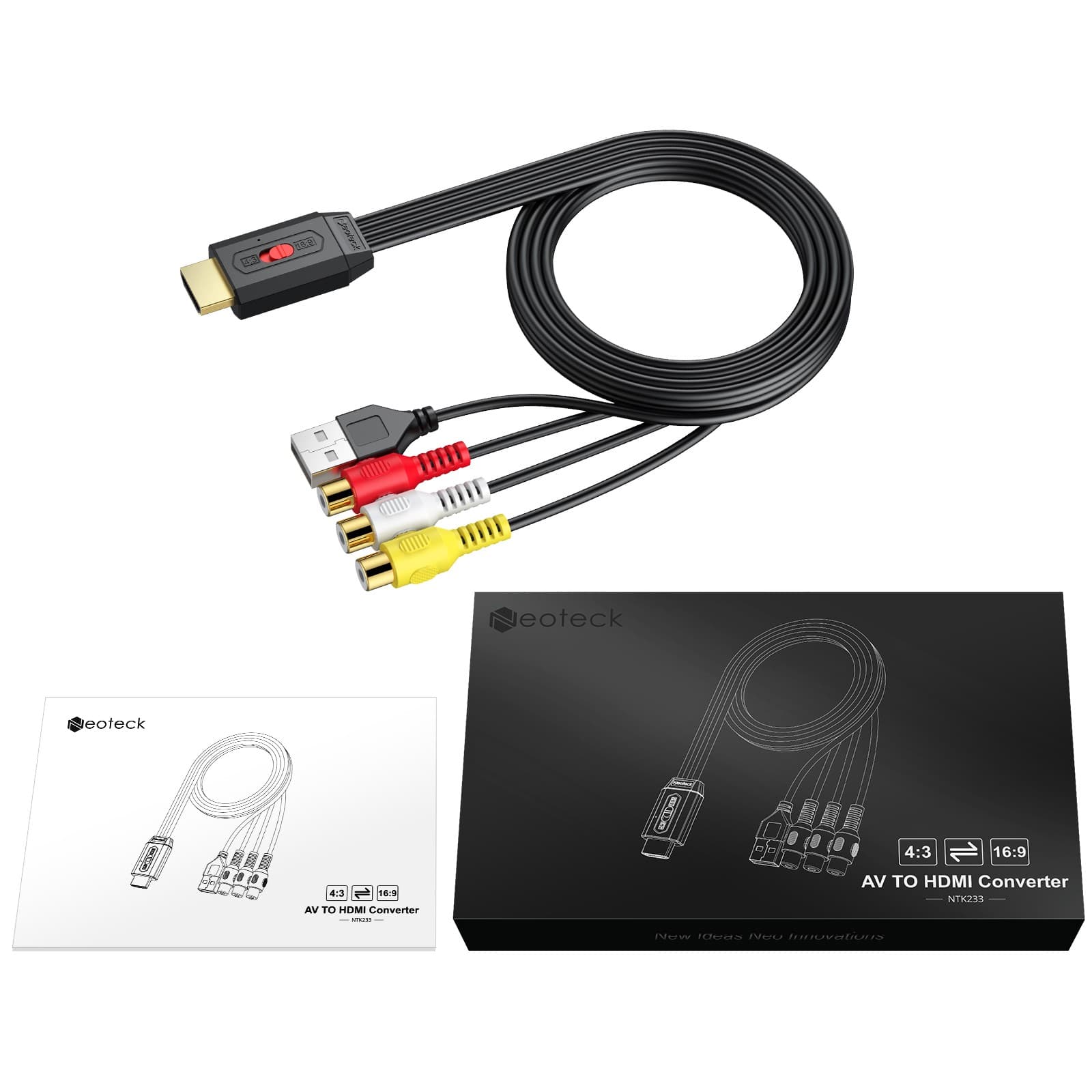
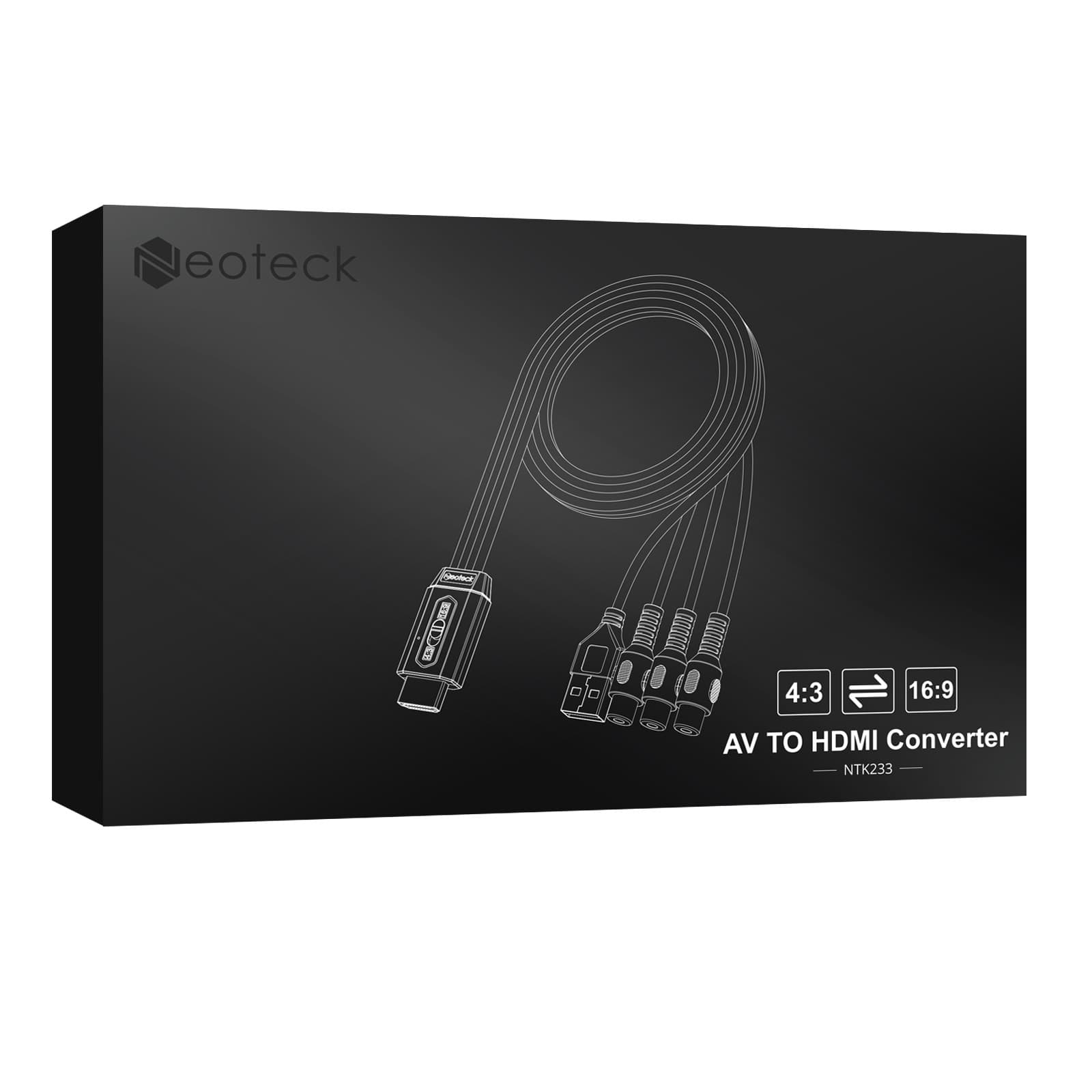
A black AV-to-HDMI converter cable with a gold-contact HDMI plug at one end and three colour-coded RCA female sockets in red, white, and yellow plus a USB-A connector at the other, shown alongside its retail box and instruction booklet.

Guarantees, usage and supportShow

Technical review and performance

The converter integrates signal processing electronics within the cable housing, converting composite analogue video and stereo analogue audio to a digital HDMI output signal. The HDMI connector features gold-plated contacts for corrosion resistance. USB power input drives the conversion chipset at 5 V; without USB power connected, the adapter will not output a signal.

Expert take

The cable-form design is practical — there's no separate converter box to position or lose, and the USB power tap from the television keeps the media unit tidy. The aspect ratio toggle is a genuinely useful inclusion for anyone switching between sources with different native ratios, and the colour-coded RCA connectors make the correct connection obvious without consulting a manual. This is the right tool for connecting composite-output equipment to a current display — an older retro console, a VHS player, or an early camcorder. It is not a scaler: the output will be the native resolution of the source device, which some televisions handle better than others. If your source runs at 240p, check whether your display accepts that signal before purchasing, as some sets will show a blank screen. For 480p and above, compatibility is generally reliable.

Quick guides and tipsShow

Highlighted features

  • Composite RCA to HDMI
  • 4:3 & 16:9 Switching
  • USB Powered
  • No Driver Needed
  • Plug-and-Play Setup

Key benefits

  • Use older AV equipment on any modern HDMI display
  • Set up in minutes without software, drivers, or tools
  • Power from the television's own USB port for a tidy setup
  • Switch between 4:3 and 16:9 to match the source aspect ratio

Usage recommendations

  • Run the USB power lead from your television's USB port to avoid an extra wall adapter and keep wiring tidy.
  • Set the 4:3 / 16:9 toggle to match your source's aspect ratio before switching on to avoid a stretched or compressed image.
  • If the display shows no signal, try toggling the aspect ratio switch — some sources output in a ratio that doesn't match the default setting.

What's included

  • 1 x AV to HDMI Converter Cable (composite RCA female to HDMI male)
  • 1 x USB Power Cable
  • 1 x Instruction Booklet

Materials and composition

  • PVC (cable jacket)
  • Gold-plated metal (HDMI connector contacts)
  • Plastic (RCA connector housings and cable body)

Care recommendations

  • Unplug from the USB power source when not in use to avoid unnecessary power draw.
  • Keep the RCA and HDMI connectors dry and free from dust — store in a small bag when not in use.
  • Avoid sharp bends at the connector joints, which can stress the internal wiring over time.
More information (optional)Show

Aspect Ratio Guide

Most older analogue devices output in 4:3. If connecting to a widescreen television, leaving the toggle on 4:3 shows the image with black bars on the sides — the correct presentation for content in that ratio. Switching to 16:9 stretches the image horizontally; use this only if the source material is natively widescreen.

Reviews

Ratings

Customer reviews

There are no reviews for this product yet.

Write your review

Sign in to share your experience with this product.

Frequently asked questions

Does this converter improve picture quality or upscale the image?
No — it converts the signal interface from composite RCA to HDMI. The picture quality and resolution remain those of the original source device.
What powers the converter?
The converter is powered via a USB-A cable, which can connect to a television's USB port or any standard USB charger.
Will it work with a device that outputs 240p?
Some 240p sources are not compatible. The converter generally supports 480p inputs reliably; 240p compatibility depends on the specific source and display combination.
Can I use this with a VHS player or older camcorder?
Yes — any device with composite RCA outputs (yellow for video, red and white for audio) is compatible as the source.
What does the 4:3 / 16:9 toggle do?
It adjusts the output aspect ratio to match either a 4:3 source (traditional square-format) or a 16:9 source (widescreen), so the image fills your display correctly without black bars on the wrong sides.
  • Fast delivery
Charge 12 Devices at Once with This Desktop USB Hub

Home improvement

Charge 12 Devices at Once with This Desktop USB Hub

£12.99Available
  • Fast delivery
All-in-One Charging Hub with 6 Sockets and Smart USB-C

Home improvement

All-in-One Charging Hub with 6 Sockets and Smart USB-C

£10.15Available
  • Fast delivery
Set of 4 Adjustable Levelling Feet in Zinc-Plated Iron for Furniture & Machinery

Home improvement

Set of 4 Adjustable Levelling Feet in Zinc-Plated Iron for Furniture & Machinery

£10.99Available
  • Fast delivery
Light Up Any Event With Multicolour LED Foam Glow Sticks

Indoor/outdoor lighting

Light Up Any Event With Multicolour LED Foam Glow Sticks

£11.99Available
  • Fast delivery
Round Parchment Paper Liners for Air Fryers, 20 cm, 100 Per Pack

Home improvement

Round Parchment Paper Liners for Air Fryers, 20 cm, 100 Per Pack

£11.99Available
  • Fast delivery
9-Inch Air Fryer Liners

Home improvement

9-Inch Air Fryer Liners

£12.99Available
  • Fast delivery
Grey Textured Peel and Stick Wallpaper

Home improvement

Grey Textured Peel and Stick Wallpaper

£12.99Available
  • Fast delivery
Smiling Pumpkin Halloween String Lights

Home improvement

Smiling Pumpkin Halloween String Lights

£12.99Available