Clear and trackable delivery Real guarantees on every order Fast help when you need it
Villalta Home Co.
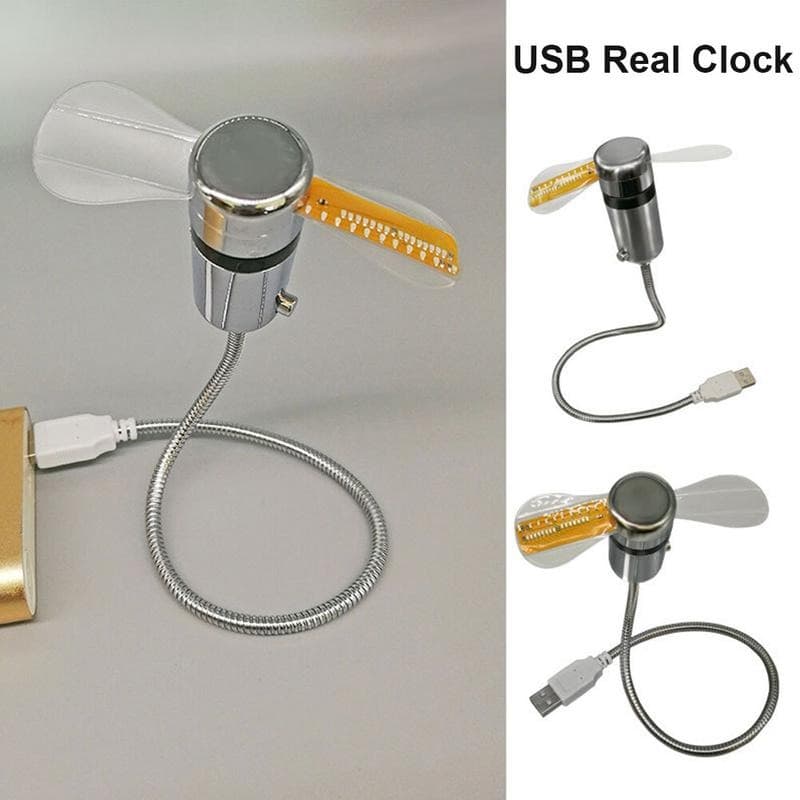
A USB Fan That Doubles as a Clock and Temperature Display - Default
A USB Fan That Doubles as a Clock and Temperature Display - image 2
A USB Fan That Doubles as a Clock and Temperature Display - image 3
A USB Fan That Doubles as a Clock and Temperature Display - image 4
A USB Fan That Doubles as a Clock and Temperature Display - image 5
A USB Fan That Doubles as a Clock and Temperature Display - image 6
A USB Fan That Doubles as a Clock and Temperature Display - image 7
A USB Fan That Doubles as a Clock and Temperature Display - image 8
1/8

A USB Fan That Doubles as a Clock and Temperature Display

Home improvementInstallation Basic
Fast delivery
Estimated delivery in 3 days
£15.83
Dimensions:260 x 130 x 40 mm
Weight:0.100 kg
Home improvement
Total price£15.83
Secure checkout
Tracked delivery
Email support

Quick purchase

£15.83

A USB Fan That Doubles as a Clock and Temperature Display

Default

Buy with context

Fit, prep and delivery

Estimated delivery in 3 days with tracked fulfilment.

Best for

  • Read the time at a glance without reaching for your phone
  • Free up desk space by combining a fan and a clock into one unit
  • Stay cool and track time and ambient temperature simultaneously

What's included

  • 1 x USB LED clock fan with integrated USB power lead
  • 1 x Instruction manual

Availability and fulfilment

  • Available stock: 172 units
  • Ships to United Kingdom
  • Estimated delivery in 3 days
  • Package weight: 0.1 kg

A USB Fan That Doubles as a Clock and Temperature Display

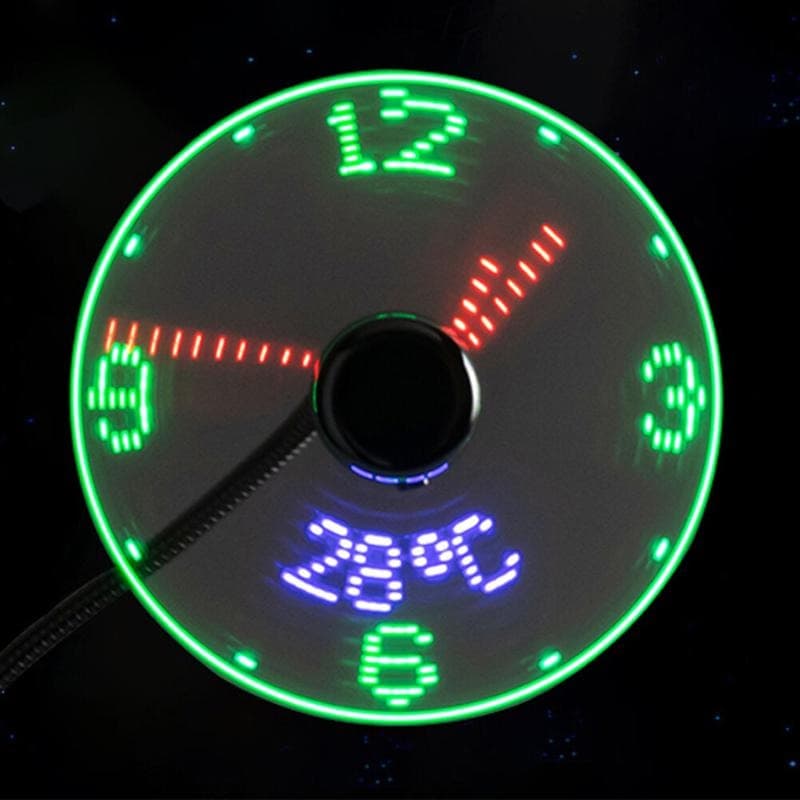
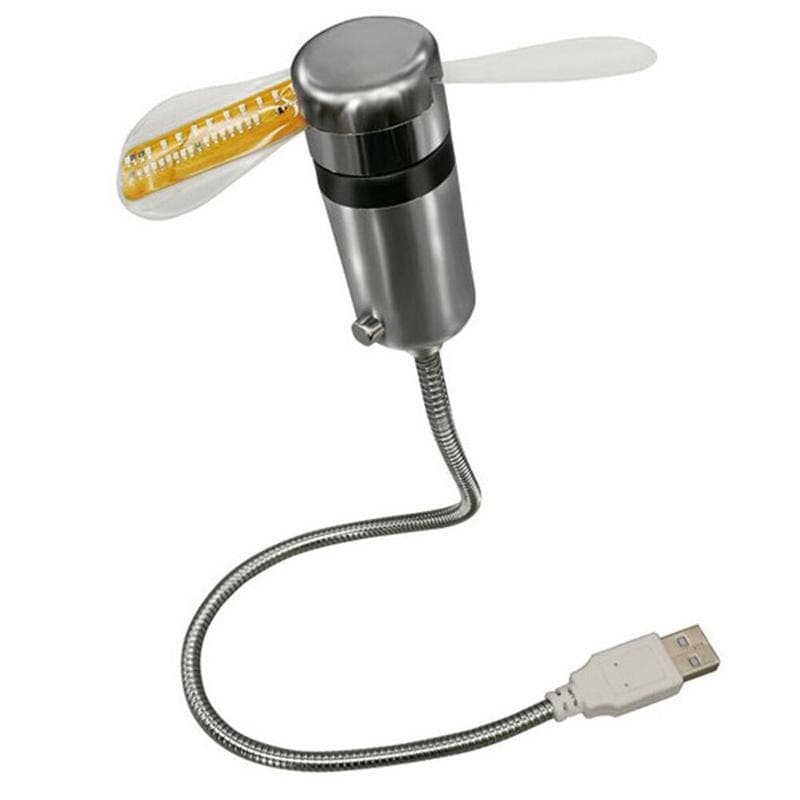
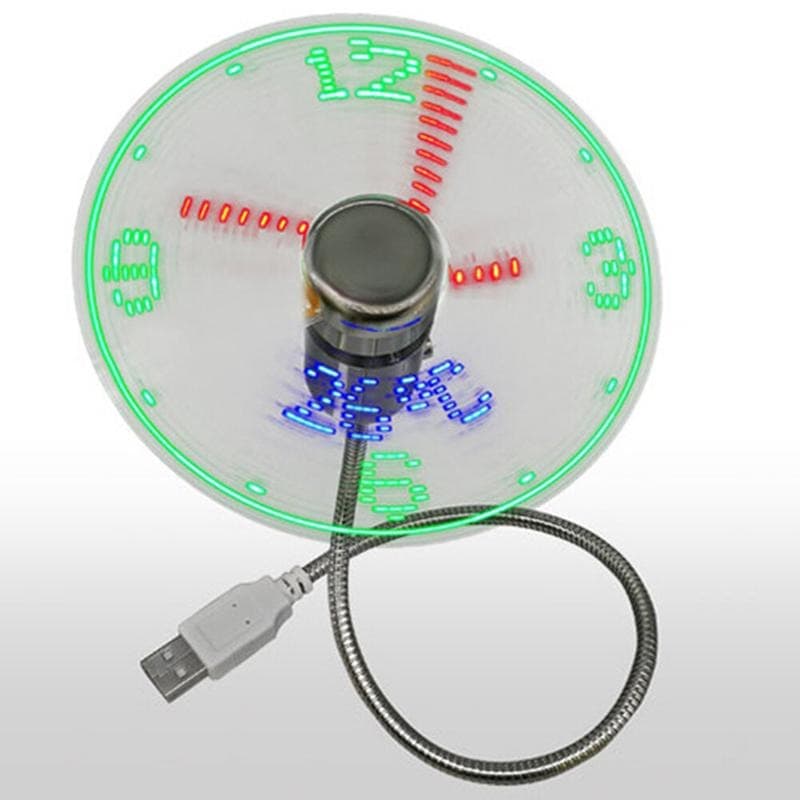
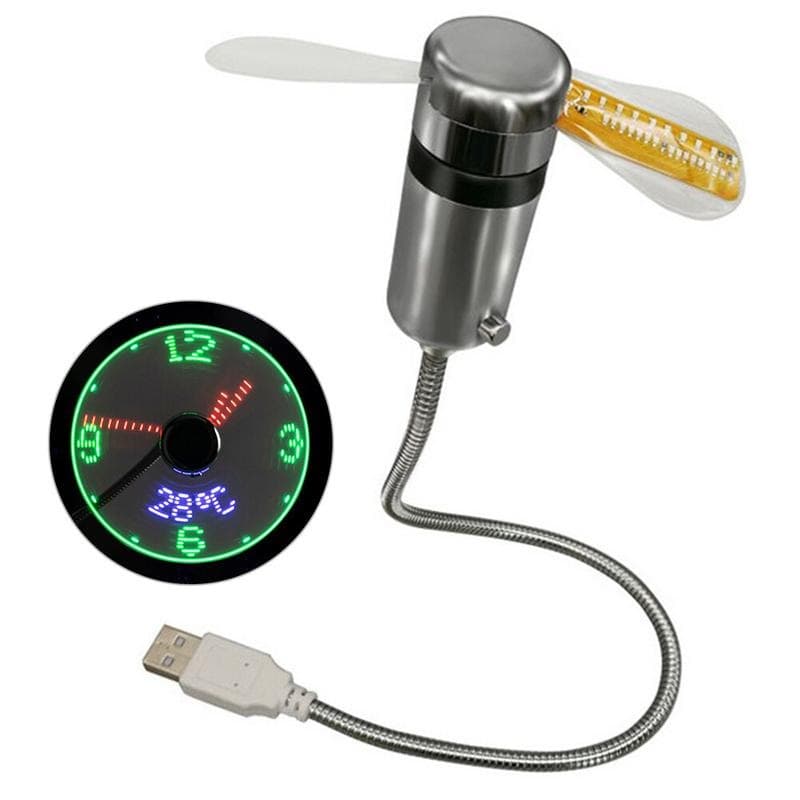
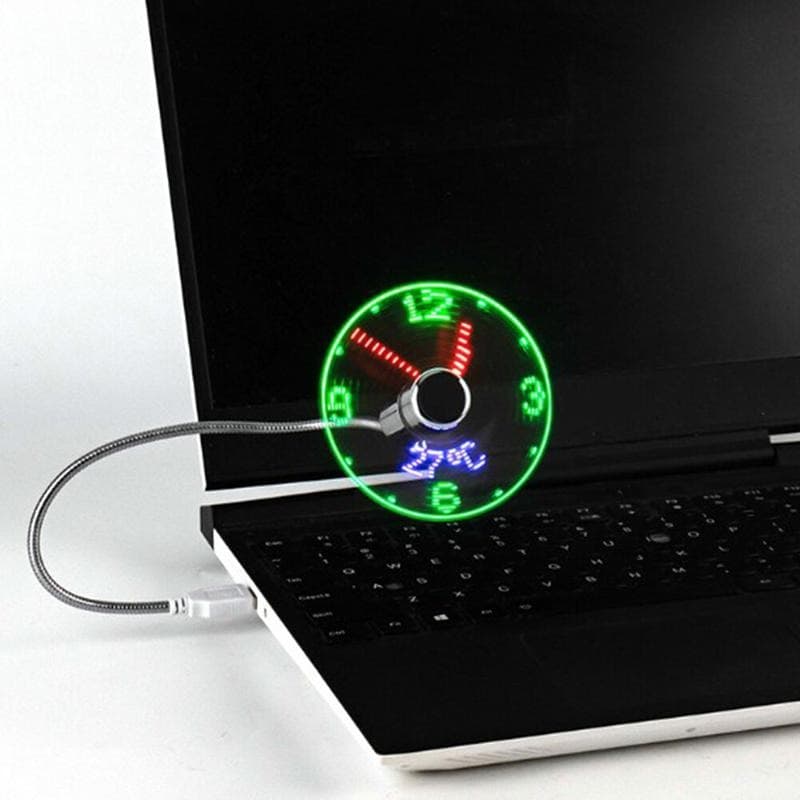
This USB desk fan uses persistence-of-vision LED technology to project a working clock face while it spins. Green LEDs form the clock numerals and outer ring, red LEDs trace the hour and minute hands, and blue LEDs display the current ambient temperature below the clock face. The fan draws DC 5V via USB, connecting directly to a laptop port, USB hub, or standard phone charger without a separate power supply. It provides a gentle directional desk breeze while the display runs, making it a functional fan rather than a purely decorative item. One compact unit replaces a small fan and a desk clock without consuming the space of two separate gadgets.

  • LED Clock Display While Spinning: Green numerals, red clock hands, and a blue temperature readout are all visible in the fan blades via persistence-of-vision LED technology.
  • DC 5V USB Powered: Connects directly to laptop USB ports, USB hubs, or standard 5V phone chargers — no separate power supply required.
  • Time and Temperature Combined: Displays both the current time and ambient temperature simultaneously, replacing two desk accessories with one.
  • Genuine Desk Fan Airflow: Provides a light directional breeze while the display is active, making it a functional fan rather than a purely decorative gadget.
  • Compact Desk Footprint: Fan and clock in the space of a single small fan, keeping the desk surface clear for other items.

A Fan That Shows the Time While It Spins

This DC 5V USB fan uses persistence-of-vision LED technology to display a live clock face when the blades are spinning. Green LEDs form the clock numerals and outer ring, red LEDs trace the hour and minute hands, and blue LEDs show the current temperature below the clock face — all visible while the fan runs and cools normally.

Powered by USB at DC 5V

The fan connects via an integrated USB lead and draws DC 5V, making it compatible with laptop ports, USB hubs, and standard USB phone chargers. No separate power supply or adaptor is needed.

A Dual-Purpose Desk Accessory

The practical argument for this fan is desk economy: it replaces both a small fan and a desk clock without adding significant width or height to your workspace. The LED display is visible in normal home and office lighting, though it shows up most clearly in moderate to low ambient light.

Key benefits

  • LED Clock Display While Spinning: Green numerals, red clock hands, and a blue temperature readout are all visible in the fan blades via persistence-of-vision LED technology.
  • DC 5V USB Powered: Connects directly to laptop USB ports, USB hubs, or standard 5V phone chargers — no separate power supply required.
  • Time and Temperature Combined: Displays both the current time and ambient temperature simultaneously, replacing two desk accessories with one.
  • Genuine Desk Fan Airflow: Provides a light directional breeze while the display is active, making it a functional fan rather than a purely decorative gadget.
  • Compact Desk Footprint: Fan and clock in the space of a single small fan, keeping the desk surface clear for other items.
  • LED Clock While Spinning
  • Time & Temp Display
  • USB Powered DC 5V
  • Compact Desk Fan
  • Colour-Coded LED Digits

Key specifications

Essential details for your purchase

Size, materials and availability at a glance

Dimensions
130 x 40 x 260
Package weight
0.1 kg
Estimated delivery time
3 days
Materials
Others
Packaging
Carton
Ships from
United Kingdom
Global inventory available
172 units

Details to help you decide

Description and experienceShow

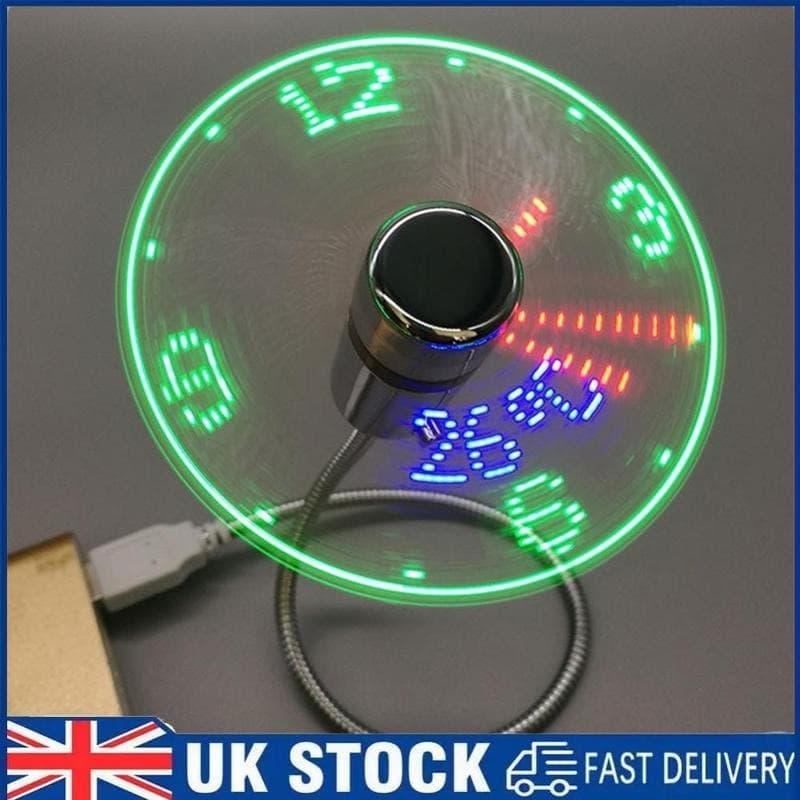
Persistence-of-vision fans project an image by flashing LEDs at precise intervals as the blades spin, creating the illusion of a stable image in mid-air. This DC 5V USB model uses that technology to display a working clock face — green LED numerals around the circumference, red LED hands tracking the time, and a blue temperature readout in the lower half of the disc. The result is a desk accessory you will actually look at. It connects to any DC 5V USB source: a laptop, a USB power bank, a phone charger, or a desktop USB hub. The fan produces a gentle directional airflow while the display is active, so it functions as a real desk fan rather than a purely decorative item. The display is most legible in moderate to low ambient light; in very bright conditions the LED contrast can reduce readability slightly. Setting the time requires a brief button press sequence, details of which are in the included manual.

A USB desk fan in mid-spin displaying a persistence-of-vision LED clock face: green numerals and an outer ring, red hour and minute hands, and blue LED digits showing 28°C at the lower centre of the disc.

Guarantees, usage and supportShow

Technical review and performance

The fan uses persistence-of-vision (POV) technology, where LEDs mounted on the spinning blades flash at precisely timed intervals to create a stable visual image in apparent mid-air. The motor shaft connects to a circular blade unit that acts as the LED array carrier. Construction is primarily plastic, keeping weight low and preventing significant rotational imbalance. The USB lead is integrated into the base of the fan body.

Expert take

The persistence-of-vision display is genuinely effective — the clock face is readable and the colour-coding of green for numbers, red for hands, and blue for temperature makes the information easy to parse at a glance. The display is clearest in moderate ambient light; in a very bright south-facing office it can wash out slightly, so placement matters. The fan produces a light, directional airflow typical of small USB desk fans. It is not a replacement for a larger room fan, but it is adequate for directed desk cooling on a warm day. The combined function makes it a practical choice for a compact desk setup where every bit of surface area counts, or as an unusual gift for someone who enjoys gadgets that do two things at once.

Quick guides and tipsShow

Highlighted features

  • LED Clock While Spinning
  • Time & Temp Display
  • USB Powered DC 5V
  • Compact Desk Fan
  • Colour-Coded LED Digits

Key benefits

  • Read the time at a glance without reaching for your phone
  • Free up desk space by combining a fan and a clock into one unit
  • Stay cool and track time and ambient temperature simultaneously
  • Power from any standard USB port without an extra adaptor

Usage recommendations

  • Place the fan on a firm, flat surface — vibration from an uneven desk can cause the blades to wobble slightly, which reduces display clarity.
  • Position in a moderately lit environment for the clearest LED display; direct bright sunlight behind the fan reduces LED contrast.
  • Set the clock immediately after first use — the display defaults to 12:00 and will not update automatically without manual input.

What's included

  • 1 x USB LED clock fan with integrated USB power lead
  • 1 x Instruction manual

Materials and composition

  • Plastic (fan body and blade assembly)
  • Metal (motor shaft)

Care recommendations

  • Wipe the fan blades with a dry or slightly damp cloth monthly to remove dust build-up, which can unbalance the blades and reduce display clarity.
  • Unplug before cleaning — never wipe the blades or body while the fan is connected to a USB power source.
  • Check the USB connector every few months for signs of wear or loose contact; a poor connection can cause flickering in the LED display.
More information (optional)Show

How Persistence-of-Vision Works

When the blades spin at speed, LEDs along each blade flash at precise intervals timed to the blade's rotational position. Your eye retains each flash fractionally longer than it actually lasted, stitching the individual flashes together into a coherent image. The faster the blade and the more precisely the LEDs are timed, the sharper the resulting clock face appears.

Reviews

Ratings

Customer reviews

There are no reviews for this product yet.

Write your review

Sign in to share your experience with this product.

Frequently asked questions

How do you set the time on the clock display?
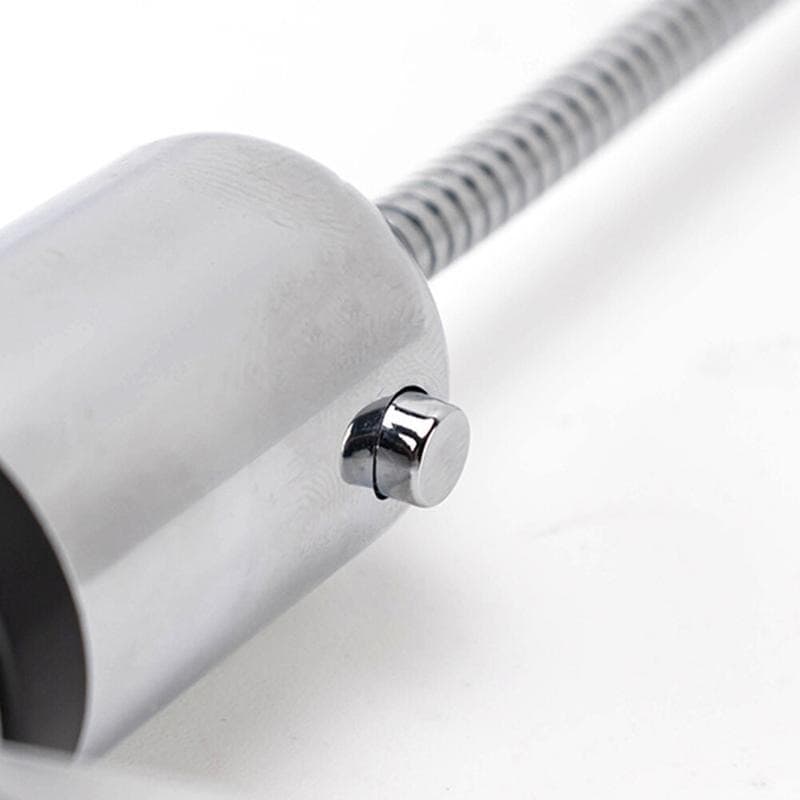
The time is set via small buttons on the fan body. The included manual covers the process, which typically involves holding a button to enter set mode and pressing to advance the hours and minutes.
Does the LED display work at all fan speeds?
The persistence-of-vision display requires the blades to spin at a consistent speed. Very low speeds may cause the image to flicker or appear incomplete — normal operating speed gives the clearest result.
What USB output does it need?
The fan runs on DC 5V, the standard voltage for USB-A ports on laptops, hubs, and 5W phone chargers.
Is the temperature shown in Celsius or Fahrenheit?
The display shown in the product image reads in Celsius. Check the included manual for information on switching between °C and °F if needed.
How loud is the fan at normal speed?
Small USB fans at this blade diameter produce a low background hum. The level is comparable to other USB desk fans of similar size and is unlikely to be intrusive in a home office.
  • Fast delivery
10-Piece Fairy Garden Miniature Set — Fairies, Animals and Furniture

Garden & outdoors

10-Piece Fairy Garden Miniature Set — Fairies, Animals and Furniture

£15.99Available
  • Fast delivery
Black Acoustic Wall Panels

Home improvement

Black Acoustic Wall Panels

£15.997 left

Available stock: 7 units

  • Fast delivery
Crescent Moon Tapestry Wall Hanging with Tassels

Hand & power tools

Crescent Moon Tapestry Wall Hanging with Tassels

£7.99Available
  • Fast delivery
Black Faceted Crystal Ball Cabinet Knobs Set of 8

Hand & power tools

Black Faceted Crystal Ball Cabinet Knobs Set of 8

£12.995 left

Available stock: 5 units

  • Fast delivery
16-Pack Gold Wire Rings for Wreaths and Macramé

Home improvement

16-Pack Gold Wire Rings for Wreaths and Macramé

£9.99Available
  • Fast delivery
4-Tier LED Display Case

Indoor/outdoor lighting

4-Tier LED Display Case

£28.99Available
  • Fast delivery
Deep Pink Rose Bouquet

Home improvement

Deep Pink Rose Bouquet

£36.99Available
  • Fast delivery
Create Perfect Favours with 32 Mini Glass Bottles & Corks

Home improvement

Create Perfect Favours with 32 Mini Glass Bottles & Corks

£15.99Available